
How to Evaluate Travel Tech: Making the Most of Demo Day at HAR*Wired
There's more travel tech right now than most advisors know what to do with. The market is crowded, new tools show up constantly, and everyone has a feature you didn't know you needed.
Which sounds great — until you're sitting through your fourth demo of the day and you can't remember what made the first one interesting.
Decision fatigue is real. So is the pressure to stay current. But most advisors don't struggle because they lack good options. They struggle because no one handed them a framework for evaluating what they're looking at.
That's what this is for. Whether you're building your tech stack from scratch, looking to replace something that stopped working, or heading into Demo Day at HAR*Wired 2026: here's how to cut through the noise and make decisions you'll actually feel good about six months later.
Start with the Problem, Not the Tool
The most common tech mistake advisors make isn't choosing the wrong software. It's choosing software before they've figured out what they need it to do.
Tech should solve a specific problem.
If you can't name the problem, you're not ready to evaluate the solution.
Before any demo, take five minutes and answer these questions:
- Where am I losing time in my day-to-day?
- Where do things fall through the cracks with clients?
- What am I doing manually that could reasonably be automated?
- What does my client experience actually feel like right now, and where does it break down?
- What stage is my business at, and what do I actually need right now vs. later?
That last one matters more than most people realize. A brand-new advisor building their first 20 clients needs something completely different from someone five years in with a full book of business. Buying the best tool for a business twice your size mostly just means paying for overhead you're not ready to use.
Get clear on what you need right now. Then go look at tools.
The Core Categories of Travel Advisor Tech
Most travel tech falls into one of these buckets, and knowing which bucket a tool lives in helps you evaluate it a lot faster.
CRM
Tracks your clients: trip history, communication logs, follow-ups, preferences. The foundation everything else builds on.
Itinerary & Proposal Builders
Client-facing documents: proposals, day-by-day itineraries, quote summaries. Some include portals and e-signature.
Booking Platforms
Search, compare, and book directly inside one system: flights, hotels, cruises, tours.
Automation & Workflow Tools
Takes repetitive tasks off your plate: follow-up emails, intake forms, payment reminders. The routine stuff that runs the same way every time.
Marketing Tools
Email campaigns, social scheduling, content creation. For communicating with your list at scale.
Accounting & Finance
Commission tracking, invoicing, expense management. Tells you whether you're actually making money.
AI-Powered Tools
Writing, research, itinerary drafts, client communication. Ranges from actually useful to not-quite-there depending on the tool.
A lot of tools overlap categories. A CRM might include itinerary building; a booking platform might have client communication built in. That's not a bad thing, but it's worth knowing where a tool's actual strength is before you decide it can replace something you already use.
5 Questions to Ask at Every Demo
These five questions won't make every decision obvious. But they'll cut through the marketing and get you to the things that actually matter.
1. Does this solve a problem I actually have right now?
Demos are designed to impress. Features that aren't relevant to your business can still feel exciting in the moment. The filter is simple: is this solving something that's genuinely painful in my workflow today, or is it solving a problem I might have someday? Tools that fix real, current pain generate ROI. Tools that fix hypothetical future problems generate monthly fees.
2. What does onboarding really look like?
Every tool looks clean in a demo. Ask specifically: how long does it take most advisors to get fully set up? Is there a migration process if you have existing client data? What's the learning curve? The time you spend getting set up is time you're not with clients, and demos never really acknowledge that.
3. What does support look like when something breaks?
It will break eventually. Find out whether support is live chat, email-only, or phone. Ask what the typical response time is. For client-facing tools especially, a support gap at the wrong moment is a real business problem, not just an inconvenience.
4. How does this fit with what I already use?
A tool that works in isolation creates more work, not less. Ask which platforms it integrates with natively, what those integrations actually do (not just whether they exist), and whether there's an API if you need something custom. "We integrate with everything" is not a real answer.
5. What does pricing look like as I grow?
Entry pricing is designed to get you in the door. Ask about tiers, what triggers a tier increase, and what the cost looks like once you have 100 clients or two people on your team. A tool that's affordable now but prohibitively expensive at scale may not be worth building your whole workflow around.
The Comparison Guide: Your Demo Day Tool
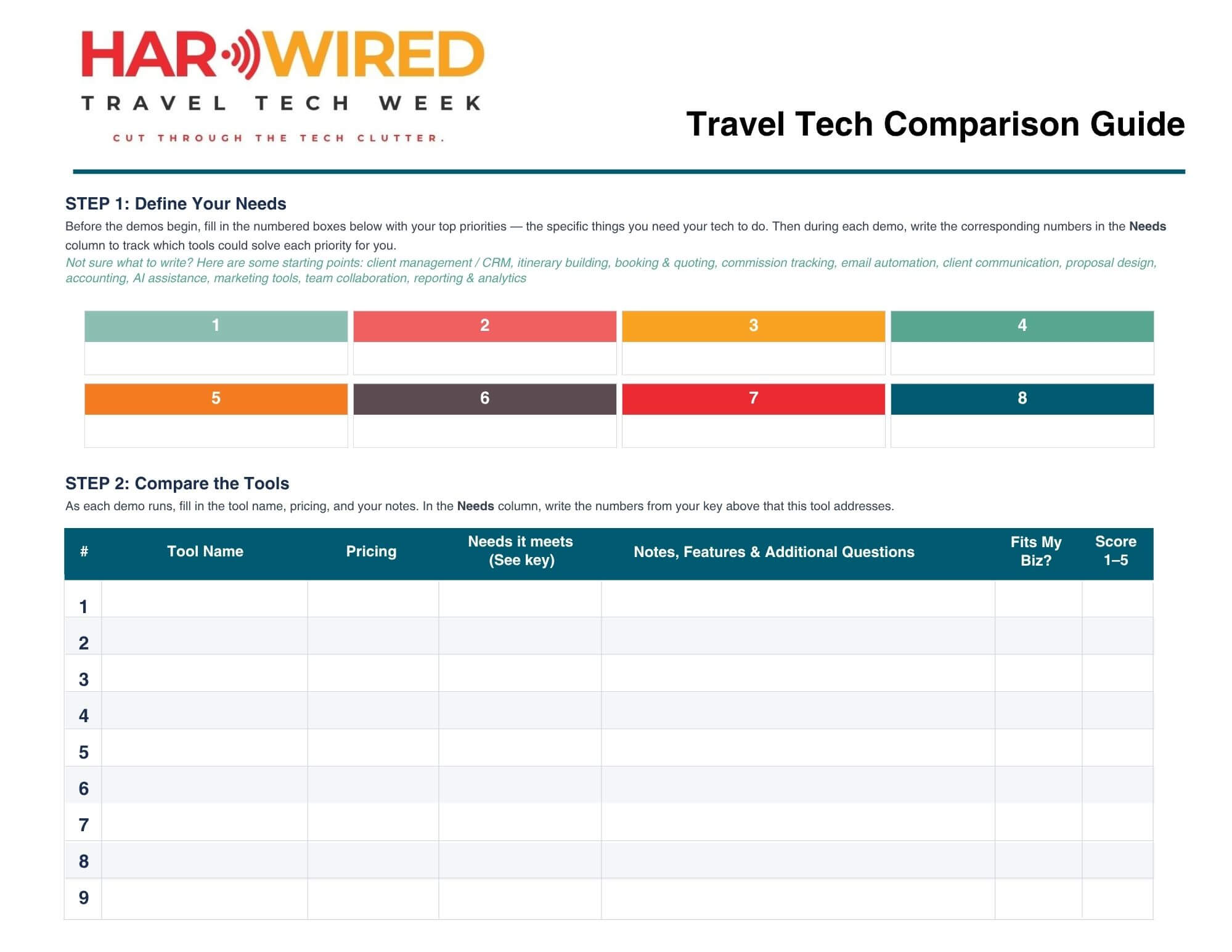
We made a free 3-page comparison guide specifically for HAR*Wired Demo Day on June 11. There's space to evaluate all 15 tools doing live demos, with columns for pricing, needs it meets, standout features, and space for your own notes in real time.
Print it or keep it open on a second screen. By end of day you'll have a side-by-side reference for every tool you watched, without scrambling to remember what stood out or trying to hold 15 products in your head at once.
After Demo Day
Don't sign up for everything that impressed you. That's how you end up paying for three tools that partially overlap and none of them working the way you hoped.
Instead: narrow your list to two or three tools that address your most pressing need right now. Look for free trials or pilot periods so you can test inside your actual workflow, not a demo environment. Ask your host agency or consortium whether they have preferred vendor relationships; you may get better pricing through them anyway.
Adopt one tool at a time. The fastest way to undermine a new system is to implement three at once and give none of them a fair shot.
Then check back in 90 days. Is it saving you time? Making your client experience better? Is it actually solving the problem you bought it to solve? The answer should be pretty clear by then.
The best tech stack isn't the most sophisticated one. It's the one you actually use. Consistently, in a way that makes your business run better.
About HAR*Wired 2026
HAR*Wired is Host Agency Reviews' annual travel tech event, built for travel advisors who want to stay ahead without the overwhelm. This year's event runs June 9–11, 2026, and it's completely free to attend.
Three days of sessions cover AI and automation, CRM strategy, marketing, and building a tech stack that actually grows with your business. Demo Day on June 11 brings 15 travel tech tools to the virtual stage for back-to-back 20-minute demos with live Q&A.
It streams live on the HAR YouTube channel. Replays are included with registration.
Register for HAR*Wired for free today!